
Connect your own domain
Point a domain you already have at your OhhWells site in about 10 minutes. Your email keeps working.
Last updated October 14, 2026
What you need
- A published OhhWells site.
- A domain you already have, such as
yourstudio.com. OhhWells connects domains from any provider. - The login for the place your domain is registered. That is your domain provider, for example GoDaddy or Namecheap.
- A paid plan.
How it works, in plain words
Your domain provider keeps a short list of settings called DNS records. They tell the internet where your website lives. You will change two of them so they point to OhhWells. Nothing else on the list needs to change.
Step 1: Add your domain in OhhWells
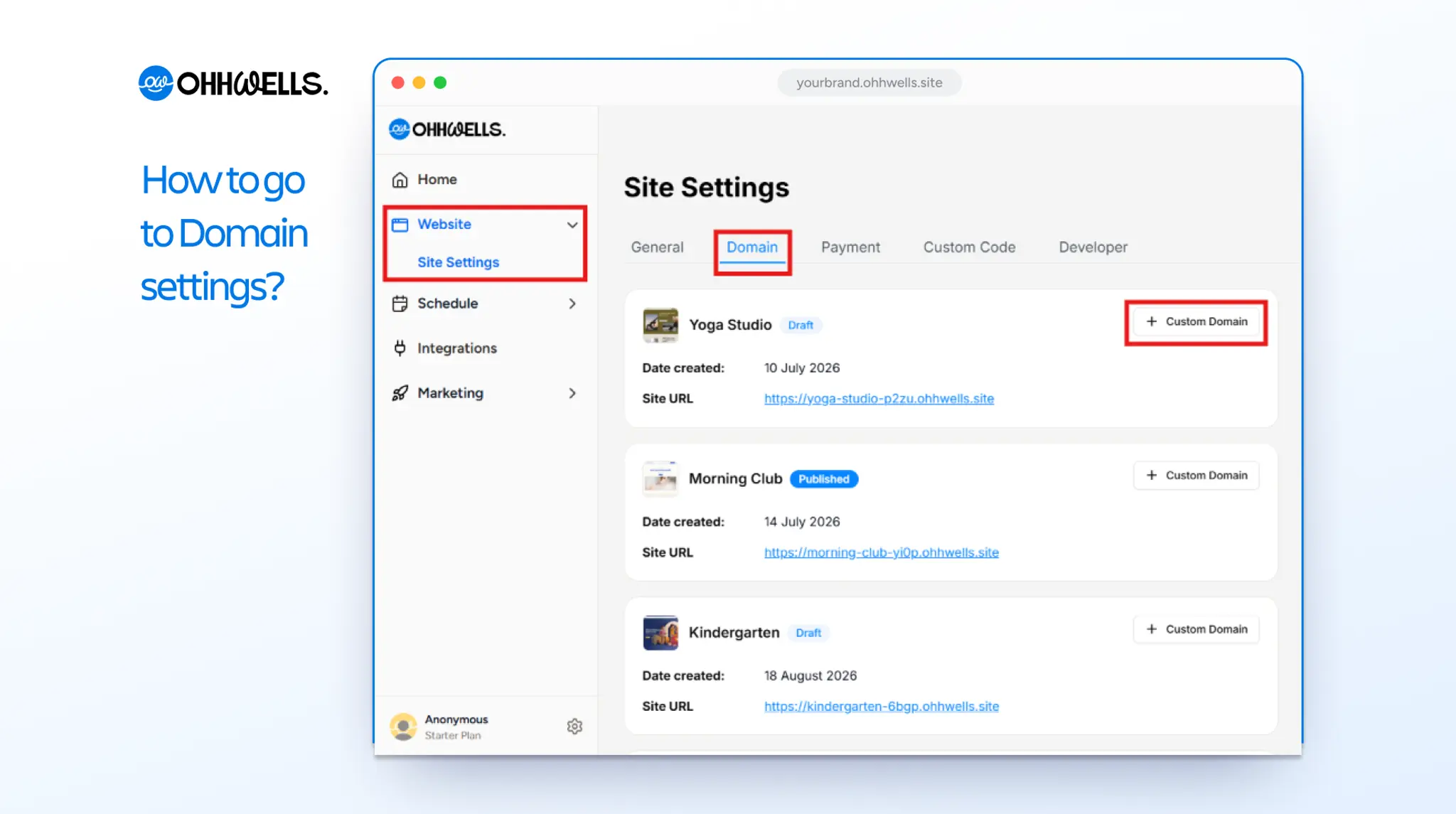
- On OhhWells Site Editor, go to Website > Site Settings, then open the Domain tab. Click + Custom Domain next to the site you want to connect.
- Type your domain, for example yourstudio.com, and confirm.
- OhhWells shows you the records to add. Keep this tab open.
Step 2: Add the records at your domain provider
Pick your provider for click-by-click steps:
- GoDaddy
- Namecheap
- Squarespace Domains (this includes domains that used to be with Google Domains)
- Cloudflare
- Wix
Using a different provider? The steps are the same everywhere:
- Log in and find the page called DNS, DNS settings or DNS records.
- Find any existing record of type A with the name @. Change its value to the one OhhWells shows, or delete it and add a new one.
- Find any existing record with the name www. Change it to a CNAME record with the value OhhWells shows.
- Save.
Step 3: Check the connection in OhhWells
- Go back to the OhhWells tab and check the status.
- Most domains connect within a few minutes. Some take up to 48 hours, depending on the provider.
- OhhWells sets up the security certificate (the padlock in the browser) automatically once the records are found.
Will my email stop working?
No. Email uses different records, called MX records. Leave those exactly as they are and your email carries on as before.
If something goes wrong
It still shows my old site, or a parking page. There is usually a second A record left over. Your main domain should have only one A record, the OhhWells one. Delete any others with the name @.
OhhWells says the domain is already connected to another project. The domain is still attached to another website host. Remove it there first, then add it in OhhWells again. Your old site stops showing at that domain once you remove it, and OhhWells takes over after the certificate is ready. Expect a short gap in between.
The browser shows a security warning. The certificate is still being set up. Wait up to an hour and try again. If you use Cloudflare, check that the records are set to "DNS only".
yourstudio.com works but www.yourstudio.com does not, or the other way round. One of the two records is missing or has a typo. Compare both against what OhhWells shows.
Still stuck? Email support@ohhwells.com and a real person will help.