
How to write an OhhWells prompt with ChatGPT or Claude
OhhWells builds your full site from one whole-page prompt of up to 3,000 characters. Copy the instruction here so ChatGPT or Claude writes one that fits.
Last updated October 9, 2026
One whole-page prompt builds your full OhhWells site. Paste it into the chat box with nothing selected, and keep it under 3,000 characters, including spaces. After that, you refine the site with short prompts that each make one change.
If you ask ChatGPT or Claude to “write a prompt to build my website”, they usually return a single brief of 6,000 characters or more. OhhWells will not accept that. Ask for one site prompt under 3,000 characters instead, plus a few short follow-ups. This page shows how.
How OhhWells prompts work
- Two kinds of prompt. OhhWells uses two kinds of prompt. A whole-page prompt, sent with nothing selected, builds your full site. After that, short prompts each make one change.
- You choose the target by clicking. Click a section to change only that section. If you click nothing, the prompt changes the whole page. You can also click a single heading, text, button, the menu bar or the footer.
- Plain language. Write your OhhWells prompt like a text to a friend who is good with websites. Don’t use headings, bullet points or markdown.
- Start with one sentence. Open your site prompt with this sentence: [Brand name] offers [what] to [who] and our website aims to [goal].
- Brand is set once. One prompt sets the colours, fonts and buttons for your whole site. New sections pick them up automatically.
- Every change is a preview. Nothing is saved until you click Accept. Click Discard to go back.
- Big changes ask first. Deleting a section, redesigning a layout or changing the whole brand shows a confirmation first. The menu bar, footer and booking settings can’t be deleted by accident.
- Length limit. Each OhhWells prompt can be up to 3,000 characters, including spaces.
Copy this into ChatGPT or Claude
Paste the text below into ChatGPT or Claude, then add your business details underneath it.
Write me a prompt for the OhhWells website builder. Follow these rules:

1. Write ONE site prompt that builds my full website. It must be under 3,000 characters including spaces. Aim for 800 to 1,500. Show the character count underneath.
2. Write it as plain sentences in a single paragraph. No headings, bullets, tables or markdown.
3. Open with this exact pattern: [Brand name] offers [what] to [who] and our website aims to [goal].
4. Then say "Build the full website" and cover, in this order: the sections I want in order, my services, my prices, FAQ topics, tone, and the one action I want visitors to take.
5. Only ask for section types OhhWells builds: hero, about, services, pricing, testimonials, team, photo gallery, FAQ, contact form, newsletter form, map and opening hours, YouTube video, logo strip, stats, what's included, call to action.
6. Only use the details I give you. Do not invent services, prices, team members or reviews. Ask for placeholder testimonials and photos that I will replace with my own.
7. Do not include member logins, shopping carts, code, SEO keywords or technical requirements.
8. After the site prompt, give me up to 5 short follow-up prompts, one change each, in one or two sentences. Above each one write "Select:" and what I should click first ("Nothing selected" for a whole-site change, or the name of the section). Use them for brand colours and fonts (free Google Fonts only), button style and the hero headline.

My business details:
[business name, what you offer, who you serve, location, services and prices, brand colours and fonts if you have them, the one action you want visitors to take]
Where do I paste each prompt in OhhWells?
- Open the editor and select nothing. Click an empty part of the canvas, or press
Esc, so the chat box shows Whole page.
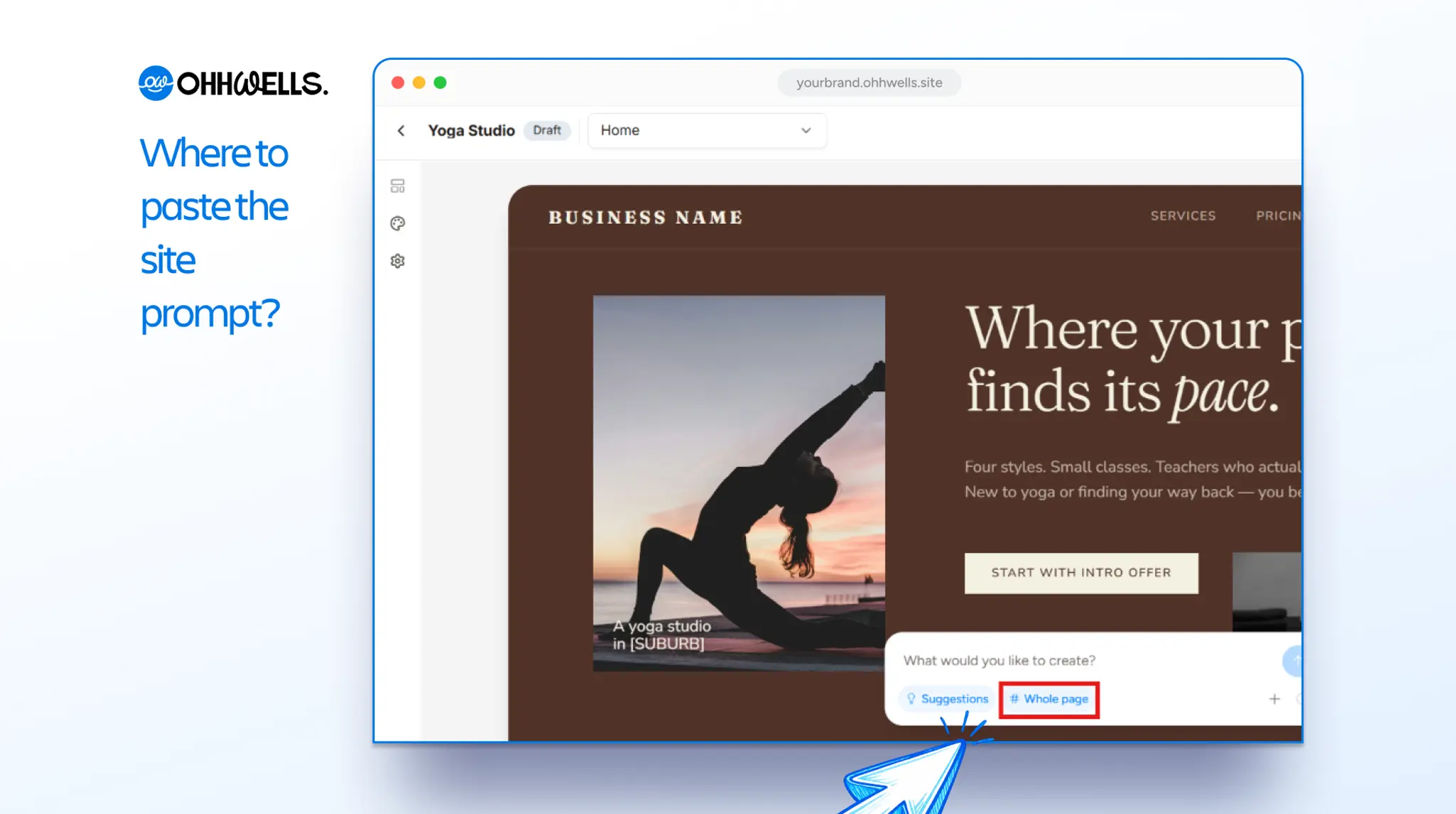
- Paste the site prompt. OhhWells builds the full site from it.
- Check the preview. Click Accept if you like it, or Discard to try again.
- Refine with the follow-up prompts. In the reply from ChatGPT or Claude, each follow-up prompt has a “Select:” line right above it. In your editor, click what that line says first, then paste the prompt underneath it. “Nothing selected” means click an empty part of the canvas, so the chat box shows “Whole page”.
What you can ask for in a single prompt
- Sharper headline
Select first: your hero headline.
“Rewrite this headline as a one-line benefit of 8 words or fewer, for [who you serve].” - Brand colours
Select first: nothing.
“Change the site’s colors to [dark green and cream].” - Exact colours and fonts
Select first: nothing.
“Set primary to [#1E4D3B], background to [#FAF8F2], text to [#122E24], accent to [#BFA6F0], headings to [Lora] and body to [Inter].” - Button style
Select first: nothing.
“Make primary buttons pill-shaped.” - Services
Select first: nothing.
“Add a services section listing [service, service, service], each with a short description and a Book Now button.” - Prices
Select first: nothing.
“Add a pricing section with 3 plans: [name and price, name and price, name and price].” - Testimonials
Select first: nothing.
“Add a testimonials section with quotes from three happy [customers].” - FAQ
Select first: nothing.
“Create an FAQ section answering common questions about [topics].” - Location
Select first: nothing.
“Add a section with our location and opening hours.” - Enquiries
Select first: nothing.
“I want a contact form in the homepage.” - Copy a layout you like
Select first: nothing, with up to 3 screenshots attached.
“Make a section like this.” - Restyle one section
Select first: that section.
“Change this section’s layout to [a two-column grid with the image on the left and text on the right].” - Tone
Select first: that section.
“Rewrite this section in a [warmer, friendlier] tone.” - Translate
Select first: that section.
“Translate this section to [language].”
Example: a full-site prompt for Good Dog Co., a dog trainer
One site prompt of under 1,000 characters, pasted with nothing selected, then three optional follow-ups.
SITE PROMPT
Select: nothing

Good Dog Co. offers in-home dog training sessions to first-time dog owners in Melbourne whose puppy has taken over the house, and our website aims to get them to book a first in-home visit. Build the full website. Sections in order: hero with a Book a First Visit button, services, what's included, pricing, testimonials, FAQ, contact form. Services, use these only: Puppy Basics, Leash Walking, Home Alone Training. Pricing, 3 plans: First Visit $89, 4 Session Pack $320, 8 Session Pack $590. FAQ topics: what happens in a first visit, rescheduling, which suburbs we cover. Tone: warm, practical, a little playful. Use placeholder testimonials and photos that I will replace. Do not invent other services or prices.

FOLLOW-UP PROMPTS

1. Select: nothing
Change the site's colors to navy and cream. Use Lora for headings and Inter for body text.

2. Select: nothing
Make primary buttons pill-shaped.

3. Select: your hero headline
Rewrite this headline as a one-line benefit of 8 words or fewer, for first-time dog owners in Melbourne.
After the last prompt, swap the placeholder testimonials and photos for your real ones, then check the phone preview before you publish.
Example: a full-site prompt for an accounting firm
SITE PROMPT
Select: nothing

Ledgerline offers fixed-fee bookkeeping and tax filing to Singapore founders with under 20 staff who are behind on their paperwork, and our website aims to get them to book a free 20-minute call. Build the full website. Sections in order: hero with a Book a Free Call button, services, what's included, stats, testimonials, FAQ, call to action. Services, use these only: monthly bookkeeping, annual filing and tax, payroll, company secretarial. Must include: fixed monthly pricing with no hourly billing. FAQ topics: pricing, switching accountants, filing deadlines. Tone: clear, reassuring, no jargon. Use placeholder testimonials, stats and photos that I will replace. Do not invent other services or prices.

FOLLOW-UP PROMPTS

1. Select: nothing
Change the site's colors to navy and cream.

2. Select: the services section
Give this section more breathing room.
Need a whole extra page, such as About or Services?
Use one page prompt per page, with nothing selected. Follow this pattern and keep it under 1,000 characters:
Build a [page type] page for [business name], a [industry] business. Audience: [who they serve]. Primary goal: [one action]. Sections in order: [hero, ..., CTA]. Tone: [tone]. Must include: [real details]. Use existing theme tokens.What if ChatGPT already gave me one long prompt?
Do not paste it into OhhWells as it is. Send this back to ChatGPT or Claude instead:
Rewrite this as one site prompt for the OhhWells website builder. It must be under 3,000 characters including spaces, written as plain sentences in a single paragraph with no headings, bullets or markdown. Open with this pattern: [Brand name] offers [what] to [who] and our website aims to [goal]. Then say "Build the full website" and list the sections in order, my services, my prices, FAQ topics and tone. Keep my business name, audience and the one action I want visitors to take. Remove SEO keywords, technical requirements, logins and shopping carts. Show the character count. Put anything that does not fit into short follow-up prompts, one change each, with a "Select:" line above each.Frequently asked questions
How long can an OhhWells prompt be? An OhhWells prompt can be up to 3,000 characters, including spaces. Longer prompts are not accepted. A full-site prompt usually needs 800 to 1,500 characters. A single change needs one or two sentences.
Can I paste a prompt from ChatGPT into OhhWells? Yes, if it is under 3,000 characters. ChatGPT’s default website briefs run to 6,000 characters or more, so ask it to follow the instruction on this page first.
Can one prompt build my whole website? Yes. Paste one whole-page prompt with nothing selected and OhhWells builds the full site. Keep it under 3,000 characters, then refine the result with short prompts that each make one change.
Why did my OhhWells prompt fail? The most common reason is a prompt over 3,000 characters, usually a long brief pasted from ChatGPT. The second is a vague prompt, such as “add a pricing section” with no plan names or prices. Shorten it to under 3,000 characters and add the missing detail.
How do I tell OhhWells which part of the page to change? Click it first. Click a section to change only that section, or click an empty part of the canvas so nothing is selected and the prompt applies to the whole page.
Can I set my brand colours and fonts with a prompt? Yes, in its own prompt. Name your colours in plain words or hex codes, and name a free Google Font. The whole site follows, and every new section arrives in your brand.
Can I show OhhWells a design I like? Yes. Attach up to three screenshots in the chat box, or paste a link, and type “Make a section like this.” OhhWells rebuilds the layout in your own colours and fonts.
Does using a prompt cost anything? AI prompts use AI credits. Editing text by hand and publishing are free. See pricing for the credits on each plan.